
Unifyed Announces General Availability of Engage v12.29


Thursday – September 25, 2025

Unifyed Engage 12.29
Summary
The following applets have been updated with new enhancements and/or resolved defects:
- Messaging
- Forms
Enhancements
At Unifyed, we classify an Enhancement as an update to an existing feature or capability to make it more advanced or to provide additional value or offer a richer user experience.
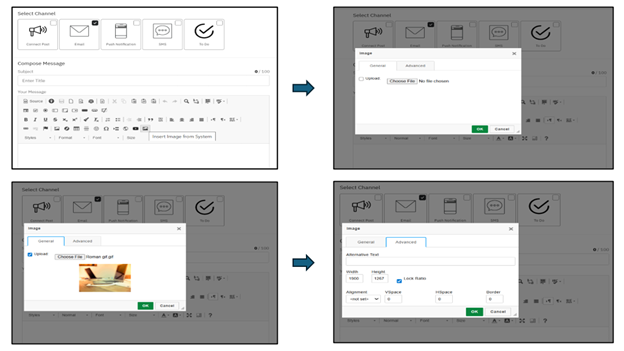
Insert Images from System in Messaging Applet
Summary:
Admins/Users can now upload and insert images directly into the Messaging Applet message body using the CKEditor, without switching to Studio Mode > Content > Manage Images.
What’s New:
- Added an Insert Image from System icon in the CKEditor toolbar.
- Users can:
- Upload images directly from their device.
- Configure advanced settings such as:
- Alternative text
- Width/Height with aspect ratio lock
- Alignment
- Vertical/Horizontal spacing (VSpace/HSpace)
- Borders
Key Improvements:
- Provides a simpler and faster alternative to the earlier multistep process of uploading images in Studio.
Impact:
Improves productivity and user experience by making message composition seamless and more intuitive.
Form Configuration with Prefill, Field Instructions, and Rich Descriptions
Summary:
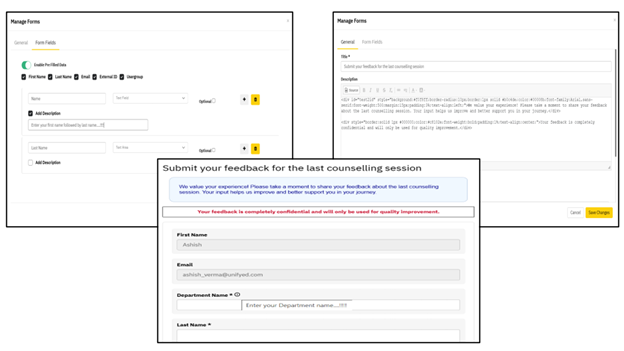
Form Administrators can now create more user-friendly and branded forms by leveraging new options for prefilled fields, contextual guidance, and formatted form descriptions.
What’s New:
- Prefilled Data for Authenticated Users
- Added a toggle to enable Prefilled Data in form settings.
- Supported fields: First Name, Last Name, Email, External ID, and Usergroups.
- Selected fields auto-populate with logged-in user profile data and are non-editable by default.
- Fields without user data display ‘NA’.
- No impact on existing forms unless updated.
- Plain-Text Field Instructions
- Each field now supports an optional Instruction text.
- If configured, an info (ⓘ) icon is shown next to the field label on the form.
- On hover/click, a tooltip displays the instruction text, guiding users without cluttering the UI.
- Rich-Text Form Description
- The Description field in the General tab now supports a rich-text HTML editor.
- Admins can add styled content using headings, bold/italic, underline, colors, and hyperlinks.
- Description is displayed on the form with the applied formatting, enabling branded and informative forms.
Key Improvements:
- Smarter forms with prefilled user details for authenticated users.
- Clearer user guidance with per-field instructions.
- Enhanced branding and readability with formatted form descriptions.
Impact:
These enhancements make forms more intelligent & user-friendly while ensuring backward compatibility with existing forms.
Fix and Simplify Save Button Functionality in Site Settings
Summary:
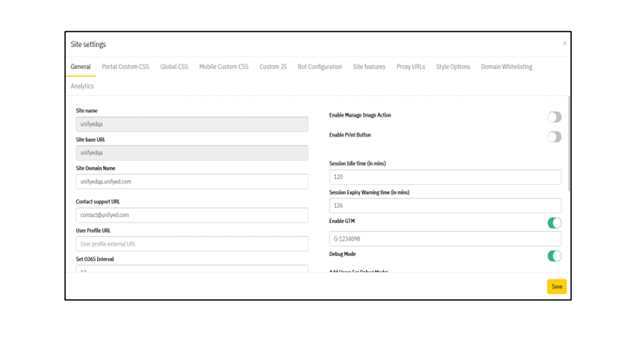
The Site Settings screen now has a simplified and corrected save action, making it easier and less confusing for administrators to apply changes.
What’s New:
- Replaced the previous two-button setup with a single functional Save button.
- The Save button now:
- Applies changes across all Site Settings tabs (General, Portal Custom CSS, Analytics, etc.).
- Performs the same save operation previously handled by “Save without validating CSS”.
- Works consistently regardless of which tab the admin is on.
Key Improvements:
- Eliminates confusion caused by the old non-functional Save button and mislabeled action button.
- Aligns with standard UI expectations — one clear action to save settings.
Impact:
Provides a more intuitive and reliable workflow for administrators when configuring Site Settings.
Improved Handling of Specific Styles in Source View
Summary:
To improve readability and structure, the following styles have been refined in how they appear in the source view of the editor:
- .page-header span → PageHeader
- .page-subheader → PageSubheader
- .attention → Attention
- .moreinfo → MoreInfo
- .table-header → TableHeader
- .table-subheader-l1 → TableSubHeader1
- .table-subheader-l2 → TableSubHeader2
- .table-subheader-l3 → TableSubHeader3
- .form-label → FormLabel
- .caption → Caption
What’s New:
- When applying these styles, the CSS code is no longer displayed in the source view.
- The styles continue to apply exactly as before, ensuring no change in user experience.
- Elements, attributes, and content remain visible in the source view — only the redundant CSS code is hidden.
- PageHeaderSpan and PageSubheader styles are now rendered as <div> elements instead of <span>, improving structure and readability in the source view.
Key Improvements:
- Cleaner source view without unnecessary CSS clutter, specifically for the styles listed above.
- No changes to how these styles render on the front end.
- All other styles remain unaffected.
Impact:
Provides a more streamlined editing experience while preserving consistent styling and improving source readability.
Resolved Defects
- Pages created via template are not editable.
- PDF and images are not open in preview mode when Preview file option is marked as checked for drive items.
Release Notes
To update an applet:
- Click on Studio from the Profile dropdown on the
- Click on App Manager from the new navigation bar that appears on the left-hand side
- Click on Unifyed Appstore
- Click on Update for all the applets that you wish to update
- Close the window and click on the Publish action in the top right corner
Accessibility Compliance
Along with the platform, this release is compliant to WCAG 2.1 AA
Supported Browser & Devices
This release is supported on the following browsers and devices:
| Supported Devices | |
| Device | Operating System |
| Android | Version 10 |
| iPad | Version 13.1 |
| iOS | Version 12+ |
| Supported Browsers | |
| Browser | Version |
| Chrome | 84.0.4147.89+ |
| Edge | 84.0.522.48+ |
| Firefox | 79.0+ |
| Safari | 12.0+ |
About Unifyed
Unifyed is a pioneer in higher education software and serves over 150 colleges and universities around the world. Unifyed partners with colleges and universities to deliver affordable solutions that help recruit, engage, educate, retain and graduate 21st century students.
For the detailed release note please visit : my.unifyed.com


